
Difference between revisions of "Manual"
From NeuroTychoWiki
| Line 6: | Line 6: | ||
# Download "Windows x86 MSI Installer" for Python 2.6.6 from http://www.python.org/download/releases/2.6.6/ | # Download "Windows x86 MSI Installer" for Python 2.6.6 from http://www.python.org/download/releases/2.6.6/ | ||
| − | ## [[File: | + | ## [[File:0805d491734b39856b5c8e178c9de66e.png]] |
# Run the installer. | # Run the installer. | ||
## [[File:c926e6405ff303a6c80625204a5b7a9f.png]] Double click this icon to start installer. | ## [[File:c926e6405ff303a6c80625204a5b7a9f.png]] Double click this icon to start installer. | ||
| Line 19: | Line 19: | ||
# Download "numpy-1.5.1-win32-superpack-python2.6.exe" from http://sourceforge.net/projects/numpy/files/NumPy/1.5.1/. | # Download "numpy-1.5.1-win32-superpack-python2.6.exe" from http://sourceforge.net/projects/numpy/files/NumPy/1.5.1/. | ||
| − | ## | + | ## File:d9f9e4c26024b18dc4b21b099e7f900d.png]] |
# Run the installer. | # Run the installer. | ||
| − | ## | + | ## [[File:347aa09541427e1dcfb7935f86d5c897.png]] Double click this icon to start installer. |
# Step through the installer program. | # Step through the installer program. | ||
## Except as otherwise noted, click "Next" to bring forward Installation. | ## Except as otherwise noted, click "Next" to bring forward Installation. | ||
| − | ## | + | ## [[File:5df43fd3c06be4c91191e64e21ec4999.png]] Choice "Python Version 2.6" and click "Next". |
**Scipy | **Scipy | ||
Scipy is a open-source python module for mathematics, science, and engineering. | Scipy is a open-source python module for mathematics, science, and engineering. | ||
# Download "scipy-0.8.0-win32-superpack-python2.6.exe" from http://sourceforge.net/projects/scipy/files/scipy/0.8.0/. | # Download "scipy-0.8.0-win32-superpack-python2.6.exe" from http://sourceforge.net/projects/scipy/files/scipy/0.8.0/. | ||
| − | ## | + | ## [[File:b5e1b8069c20d716069c8a3eb221b87a.png]] |
# Run the installer. | # Run the installer. | ||
| − | ## | + | ## [[File:55c0bcade8ab3d8a2c51dd08854a2576.png]] Double click this icon to start installer. |
# Step through the installer plogram. | # Step through the installer plogram. | ||
## Except as otherwise noted, click "Next" to bring forward Installation. | ## Except as otherwise noted, click "Next" to bring forward Installation. | ||
| − | ## | + | ## [[File:a2ee9ebb15add7638912245704e55878.png]] Choice "Python Version 2.6" and click "Next". |
**Matplotlib | **Matplotlib | ||
Matplotlib is a plotting library for the Python. | Matplotlib is a plotting library for the Python. | ||
| Line 42: | Line 42: | ||
## http://gyazo.argmax.jp/data/88d00ceb483579b5c45915a42ad2dbcf.png | ## http://gyazo.argmax.jp/data/88d00ceb483579b5c45915a42ad2dbcf.png | ||
# Download "matplotlib-1.0.1.win32-py2.6.exe". | # Download "matplotlib-1.0.1.win32-py2.6.exe". | ||
| − | ## | + | ## [[File:b3ac9b2154bafd5809b68f8cdf0ac429.png]] |
# Run the installer. | # Run the installer. | ||
| − | ## | + | ## [[File:dea1f1d5e133c39cd9a52559bb8207ab.png]] Double click this icon to start installer. |
# Step through the installer program. | # Step through the installer program. | ||
## Except as otherwise noted, click "Next" to bring forward Installation. | ## Except as otherwise noted, click "Next" to bring forward Installation. | ||
| − | ## | + | ## [[File:cd94b01550095502721ca4acc5747f28.png]] Choice "Python Version 2.6" and click "Next". |
* Sample code for analyzing neurotycho data in python. | * Sample code for analyzing neurotycho data in python. | ||
| Line 84: | Line 84: | ||
***result | ***result | ||
| − | + | [[File:ca592b24adff54e62f5e2f7af236e919.png]] | |
Revision as of 12:13, 26 February 2011
- Python installation manual for Windows
Notice that you must have administrative rights on your computer for this manual This manual is only for 32bit windows.
- Python
- Download "Windows x86 MSI Installer" for Python 2.6.6 from http://www.python.org/download/releases/2.6.6/
- Run the installer.
 Double click this icon to start installer.
- Step through the installer program.
- Except as otherwise noted, click "Next" to bring forward Installation.
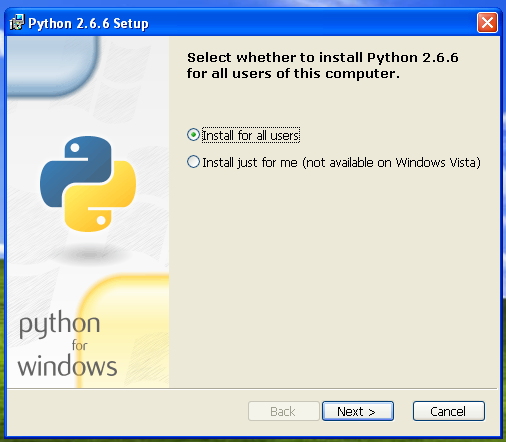 Choice "Install for all users" and click "Next."
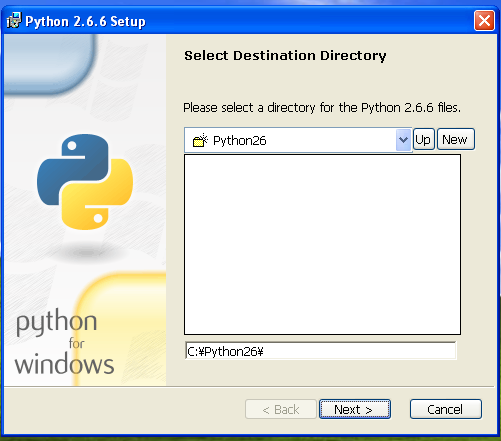 Click "next".
- File:Data/050998d9a57e931e46c2c70119982d27.png Click "next".


- Numpy
NumPy is a open-source numerical computation module for Python.
- Download "numpy-1.5.1-win32-superpack-python2.6.exe" from http://sourceforge.net/projects/numpy/files/NumPy/1.5.1/.
- File:d9f9e4c26024b18dc4b21b099e7f900d.png]]
- Run the installer.
 Double click this icon to start installer.
- Step through the installer program.
- Except as otherwise noted, click "Next" to bring forward Installation.
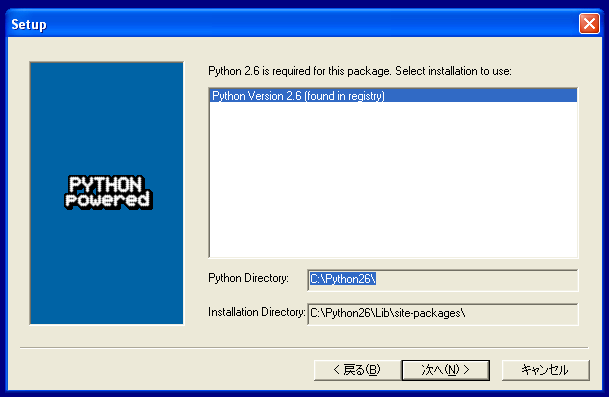 Choice "Python Version 2.6" and click "Next".


- Scipy
Scipy is a open-source python module for mathematics, science, and engineering.
- Download "scipy-0.8.0-win32-superpack-python2.6.exe" from http://sourceforge.net/projects/scipy/files/scipy/0.8.0/.
- Run the installer.
 Double click this icon to start installer.
- Step through the installer plogram.
- Except as otherwise noted, click "Next" to bring forward Installation.
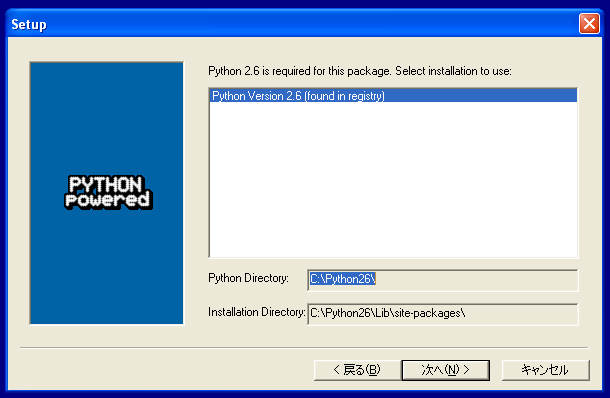 Choice "Python Version 2.6" and click "Next".


- Matplotlib
Matplotlib is a plotting library for the Python.
- Visit the official page of matplotlib at http://matplotlib.sourceforge.net/.
- Click on the http://sourceforge.net/projects/matplotlib/files/matplotlib/matplotlib-1.0.1/ link.
- Download "matplotlib-1.0.1.win32-py2.6.exe".
- Run the installer.
 Double click this icon to start installer.
- Step through the installer program.
- Except as otherwise noted, click "Next" to bring forward Installation.
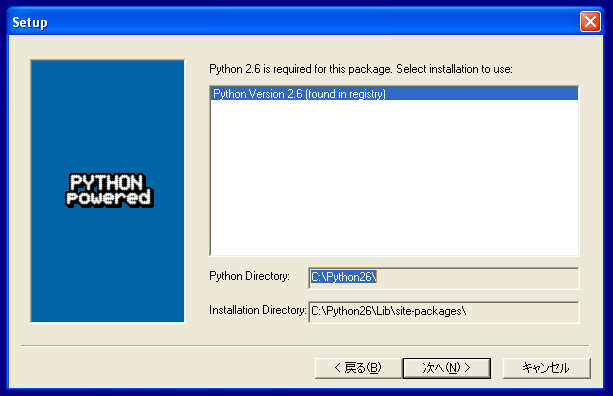 Choice "Python Version 2.6" and click "Next".


- Sample code for analyzing neurotycho data in python.
Notice the we assume "C:/neurotycho" as download directory. If You have download neurotycho datasets elsewhere, adapt the pathes below.
- plotting
#!/usr/bin/python
#-*- coding: utf-8 -*-
import numpy as np
import scipy.io
import scipy
import matplotlib
import matplotlib.pyplot as plt

_indir = "C:/neurotycho/20100604_S1_ST_K2_ToruYanagawa_mat_ECoG128-Event3/"

def load_mat(path):
    """
    loading a matlab data using scipy.io
    """
    return scipy.io.loadmat(path)

if __name__=="__main__":
    mat = load_mat(_indir+"ECoG_ch1.mat")#loading ECoG data
    data = mat["ECoGData_ch1"][0]
    event = load_mat(_indir+"Event.mat")##loading event data
    eindex = event["EventIndex"][0]#EventIndex is one-row vector contains indexes when events were occurred in ECoG data.
    fig = plt.figure()
    ax = fig.add_subplot(111)
    ax.plot(data)#plotting ECoGdata
    ax.annotate('Inject anesthetic drug',
                xy=(eindex[0],data[eindex[0]]),
                xytext=(eindex[0]-170000,2000),
                arrowprops=dict(facecolor='black', shrink=0.1,),
                )
    plt.show()
- result


